Attendance, player development
and communication with parents.
For multi-sport societies and small clubs — football, basketball, volleyball and swimming — that today keep attendance in a notebook, the schedule in a phone group, and a child's progress nowhere.
Works on phone and computer, from the same account. No app store — it opens in the browser and takes half a minute to add to the phone's home screen (guide, in Serbian).
Five notebooks instead of one app
A small club today runs five separate systems: a notebook for attendance, a phone group for the schedule, Excel for members, another notebook for membership fees, and nothing for a child's progress. Meanwhile the parent doesn't even know whether their child was at training.
Attendance that actually gets taken
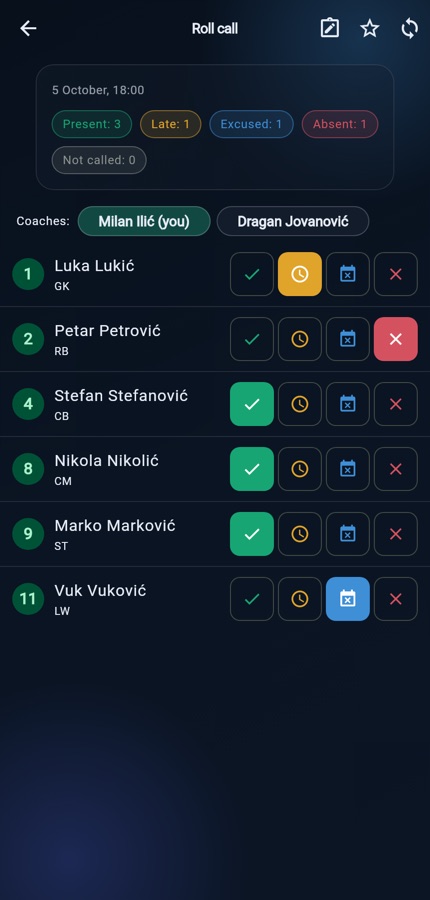
Saying in advance who's coming and the roll call on the day are two separate things, with four statuses: present, absent, late, excused. It works offline too — you record it on the pitch, and it's sent once there's signal.
Progress you can see, not hear about second-hand
Ratings across five areas, in six-week cycles. The parent gets a curve over time, not the line ‘doing well’ at the end of the season.
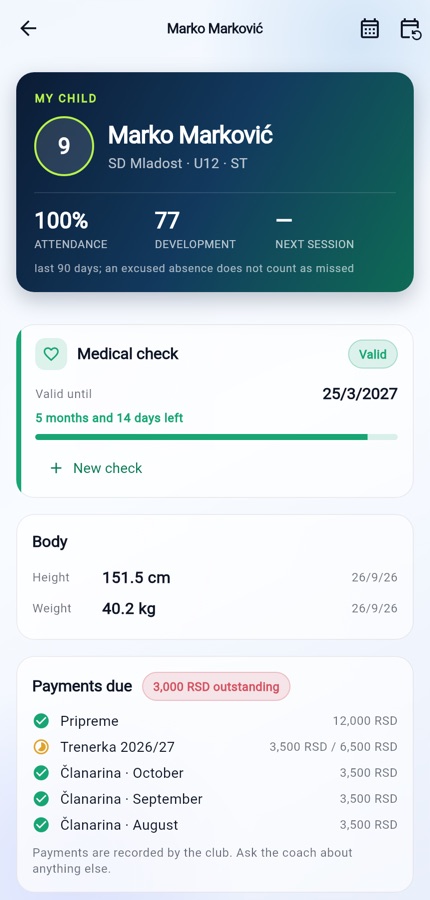
Parents get a live profile of their child
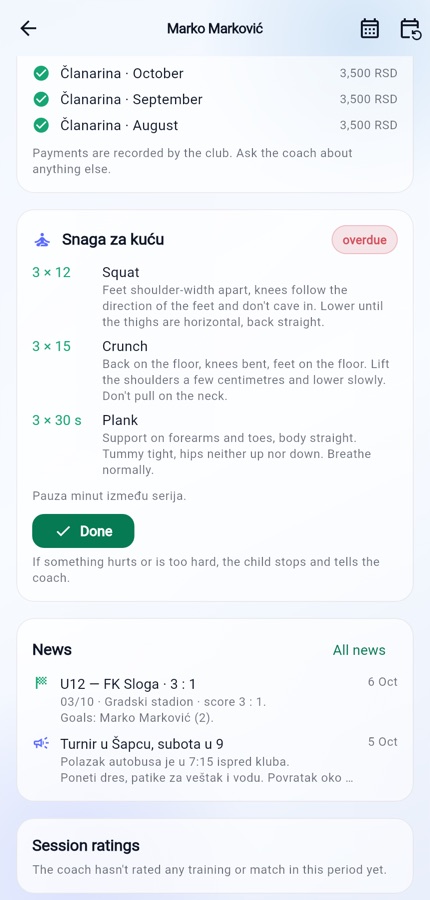
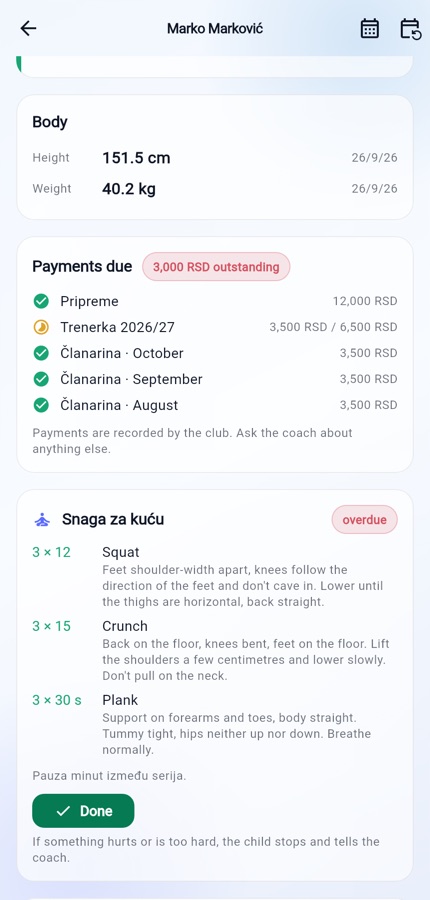
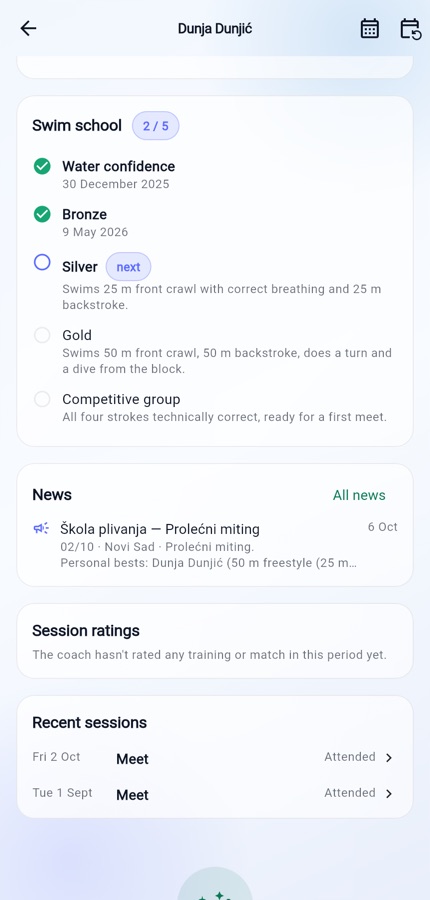
Schedule, attendance, training ratings, body measurements and match reports — in the app, for their own child and nobody else's.
Notifications that arrive on their own
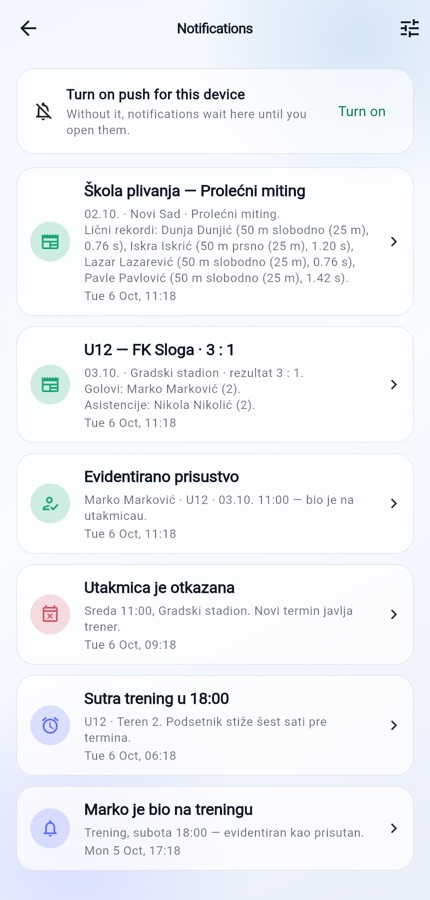
When the coach closes the roll call, the parent finds out. A reminder arrives six hours before training and a day before a match. A cancelled session is announced straight away.
Charges without the notebook
Membership fees, pre-season camps, kit — who has paid, who owes and who has paid half. The parent sees the same figure for their child.
Home practice that doesn't get lost
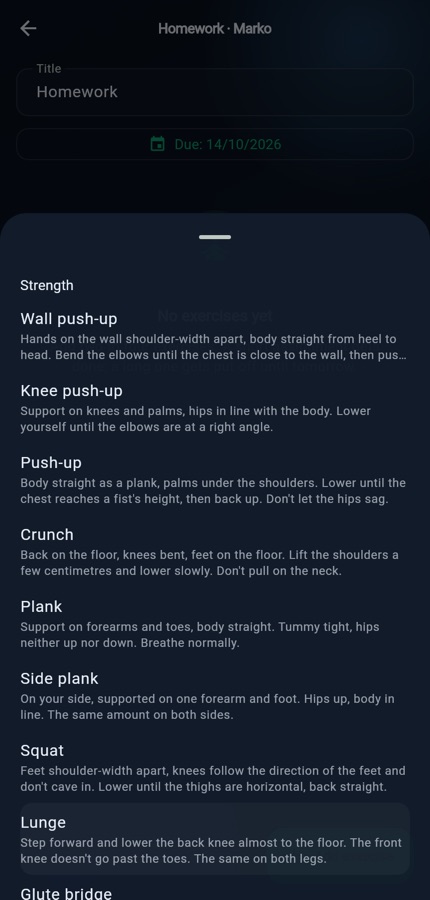
The coach picks exercises from a catalogue; the parent sees them with instructions and marks them as done.
A parents' group, but an orderly one
Team chat in the app: parents ask, the coach answers, and an announcement to everyone isn't buried after ten messages. The phone doesn't ring for every word.
Paperwork that doesn't go missing
Medical certificates with an expiry date for every child, club rules and consents that parents confirm in the app — and the club sees who hasn't yet.
Who sees what
Three people look at the same club and see three different things. The boundary is enforced not by the screen but by the database: a parent cannot reach another family's child even if they wanted to.
Roll call works offline
You record it on the pitch, and it's sent once there's signal. Each tap shows instantly, without waiting for the network.
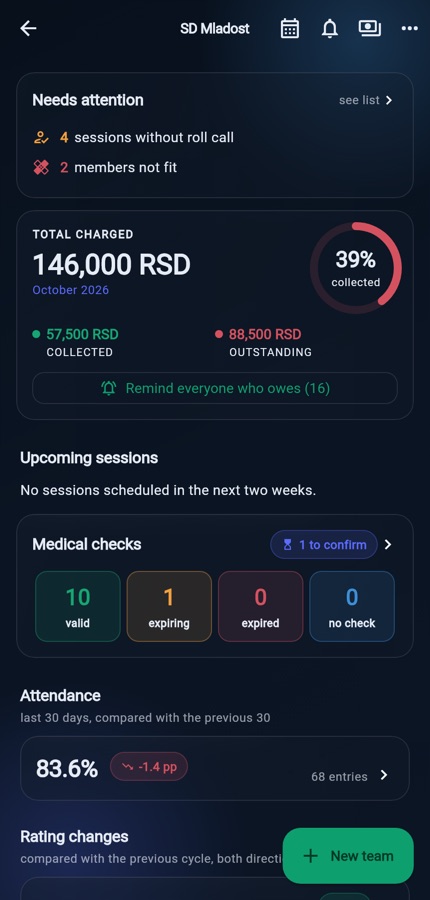
The dashboard says what needs attention today
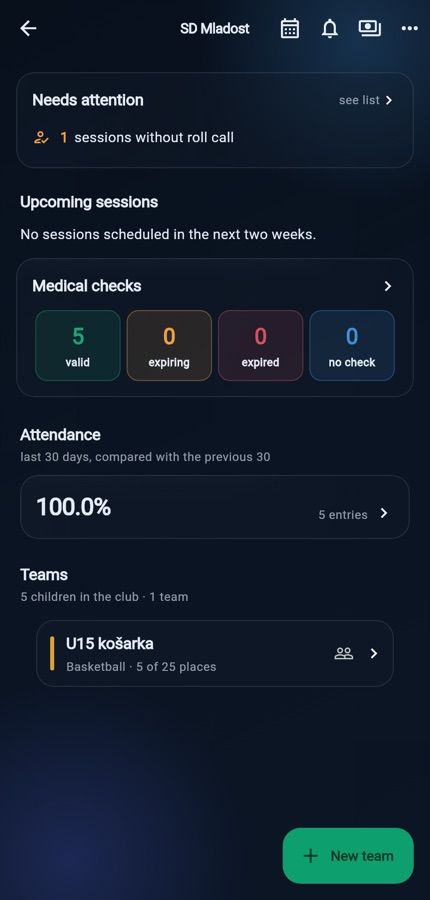
Sessions without a roll call, certificates about to expire, rating cycles past their deadline — not a list of menus.
Goalkeeper training isn't training for everyone
Individual and specialist sessions have a list of invitees. The reminder, the roll call and the parents' schedule follow that list, not the team.
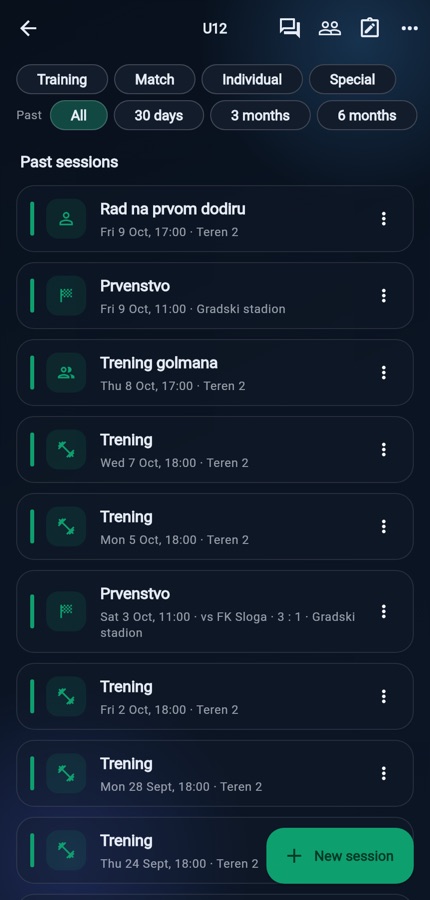
Filter in the schedule
By type and by how far back. While it's on, it says how many sessions are hidden — so a filter is never mistaken for deletion.
Only their own child
Not the club roster, not other people's children, not the coach's notes — and not because the screen doesn't offer them, but because the database doesn't let a single other row through.
Two guardians are equals
Neither parent ‘owns’ the child or has to share them with the other. Divorced parents are not a special case.
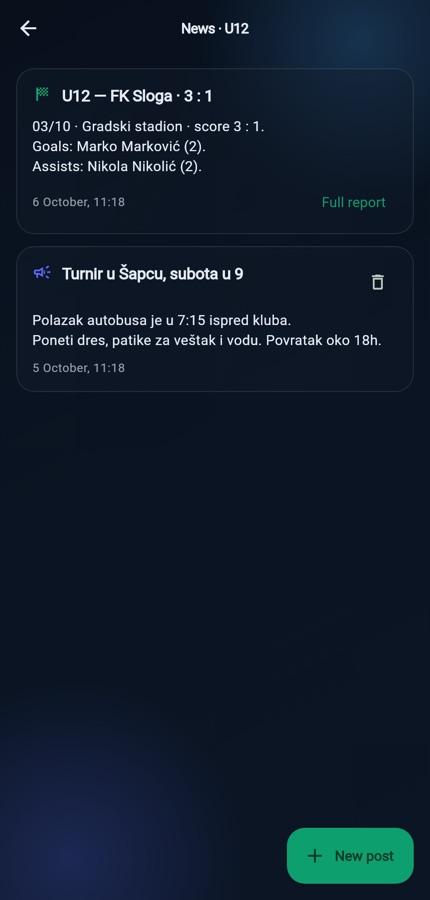
Team news, including the kind that writes itself
The club posts what it needs to; the match report is generated from the score and stats the coach has entered anyway.
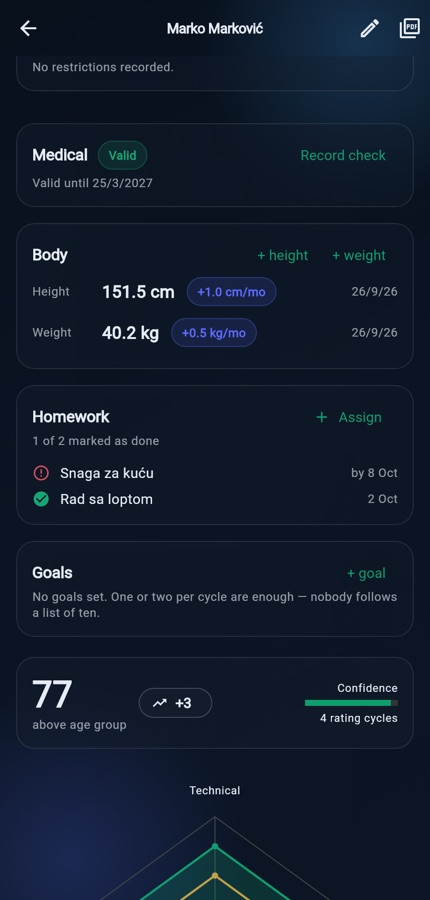
Who's improving and who's slipping
Both directions. Systems that only know ‘passed/not passed’ can't show a decline — and that's exactly what calls for a conversation.
Export for municipal funding applications
Attendance to Excel in one tap, with a legend and percentages — for funding applications and official records.
A rating that means the same with every coach
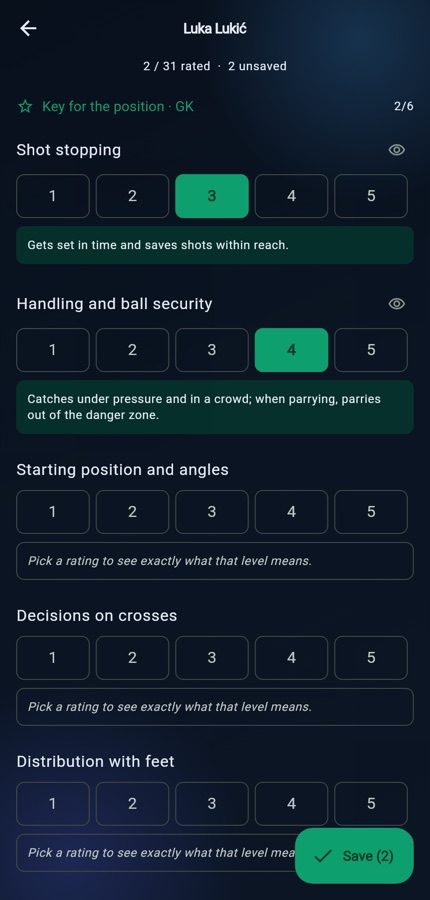
Every level has a written description of what you see on the pitch. Without it, one coach's 3 and another coach's 3 are not the same data, and the whole radar turns into noise. Try it — this is the real scale from the app:
Five areas
Technical, tactical, physical, mental and social — the same areas for every sport, with sport-specific attributes beneath them.
The position picks the list
A goalkeeper isn't rated on finishing and dribbling but on handling, shot-stopping and coming for crosses. The areas stay the same, so the radar stays comparable.
Ratings are never overwritten
The history is the product: every rating records who gave it, when, and which position the child was playing at the time.
Cycles of 4 to 12 weeks
Weekly ratings become noise; yearly ones become theatre. The app suggests six weeks and reminds the coach.
Charges and attendance, without the notebook
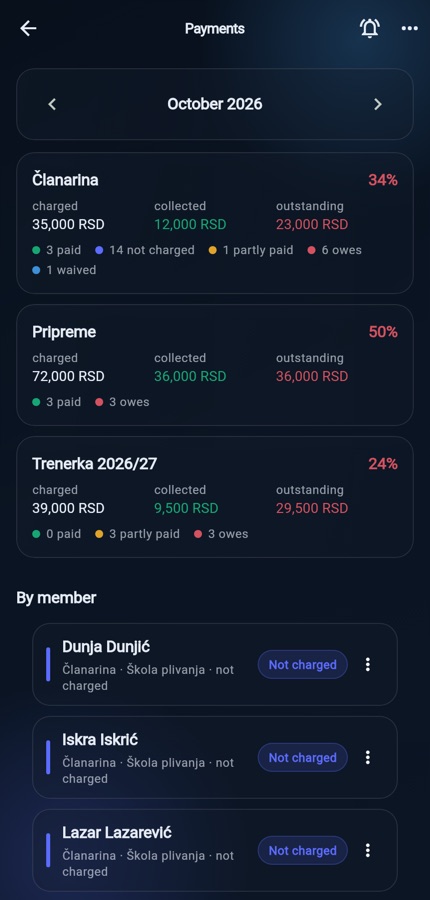
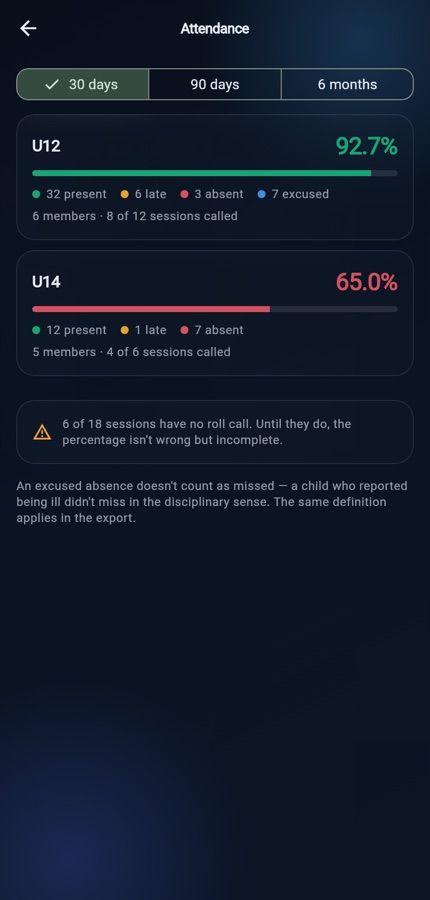
The two things an owner asks about first, which in a small club live in a notebook and in someone's head: who has paid and who owes, and which team has stopped turning up.
Not just membership fees
Pre-season camps, kit, tournament entry fees — each item separately, with its own total. A club that keeps all of it in one notebook doesn't know how much is outstanding on any of them.
Paid half — that has its own status
‘Half now, half in two weeks’ is what clubs really do. Where only yes and no exist, that has to be either wrong or a debt for the full amount — and the club chases someone who did pay.
Who hasn't even been charged
A child nobody put on the list shows up as such, rather than silently missing from it. A gap in the list is the most expensive mistake in record-keeping.
A club average hides a team that's falling apart
85% for the whole club can mean one team turns up regularly and another doesn't. The colours follow what coaches actually do: below 70%, you ring the parent.
This month's money on the dashboard
How much was charged, collected and outstanding, with a ring showing the collection rate — the first thing the owner and coach see when they open the app.
Reminders in one tap
‘Remind everyone who owes’ sends each family a notification with its own amount and items. Nobody sees anyone else's debt, the same child is reminded at most once a day, and the app also tells you which child has no account — that family you contact in person. No SMS and no per-message cost.
Kit and camps in instalments
Tracksuit, shirt, camp, pre-season: the parent sees what's paid, what's left and each instalment separately, with the date and payment method.
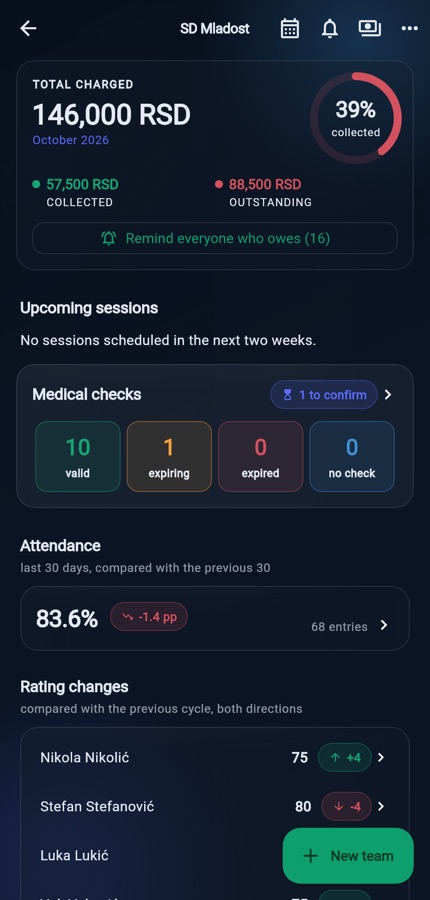
Money reaches the club however the club already handles it — the app keeps track of who has paid what, and nothing more.
Home practice that doesn't get lost
The coach sets a child exercises for home; the parent sees them with instructions and marks them as done. Sports apps have done this for years, but they address an athlete with their own account — and an eleven-year-old doesn't have one. Here the parent holds it, and that changes two things.
Exercises are chosen, not typed
Each comes with how to do it. ‘30 squats’ without a description means thirty different things, and one of them is a knee caving inwards.
One tap for the whole assignment
Not a tick per exercise: a parent who has to tick five items will tick none.
‘Done’ is the parent's word for it
Not a measurement, and that's what it's called on every screen. A number with the wrong name gets read a year later as a measure of the child's discipline.
Parents get their own app
A parent opens the app with one question — when's training, do I owe anything, was my child there, what is the club saying — and each question has its own tab in the bottom bar. With several children in the club, the child is chosen at the top and applies to every tab.
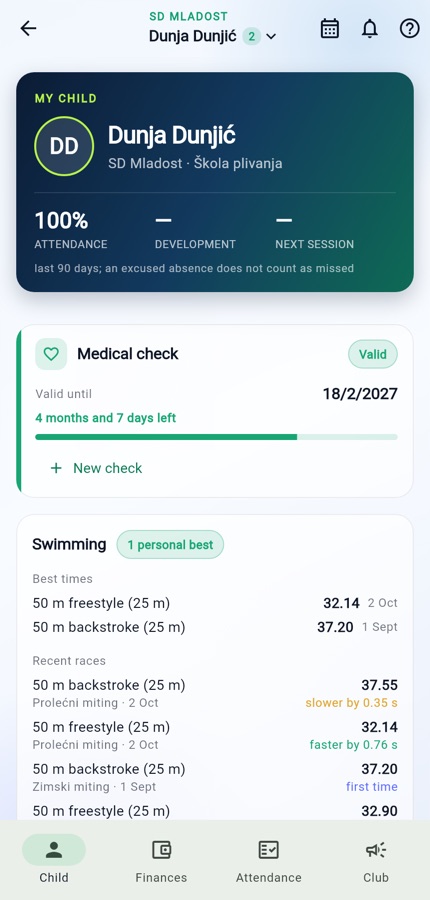
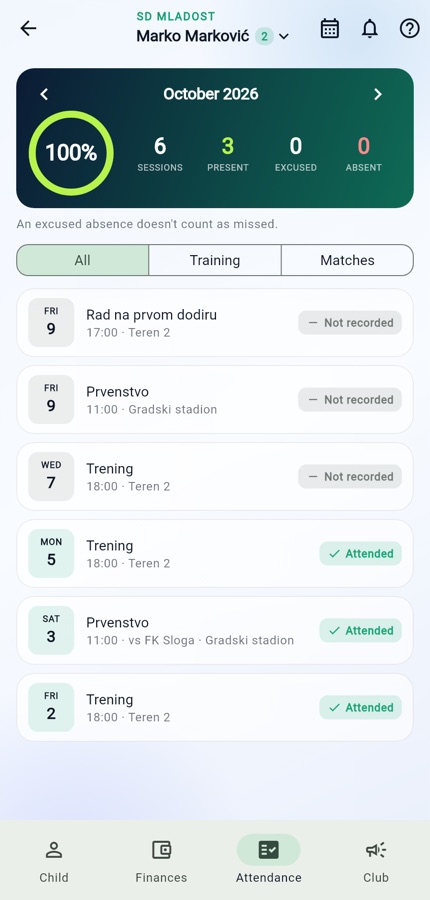
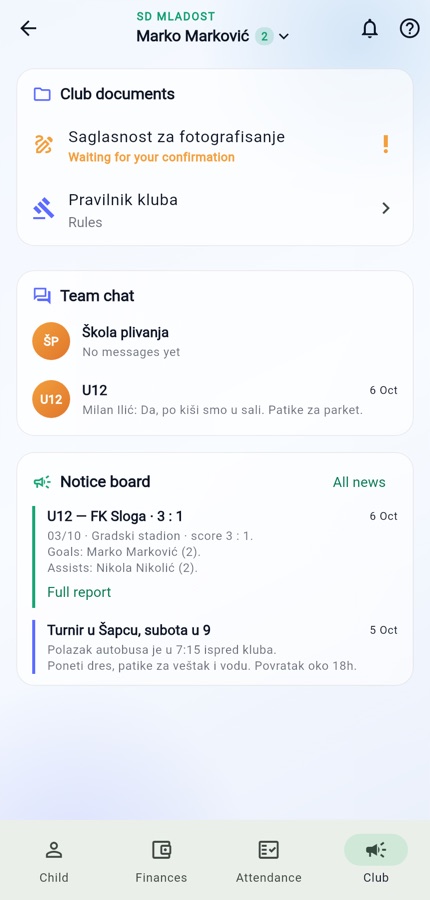
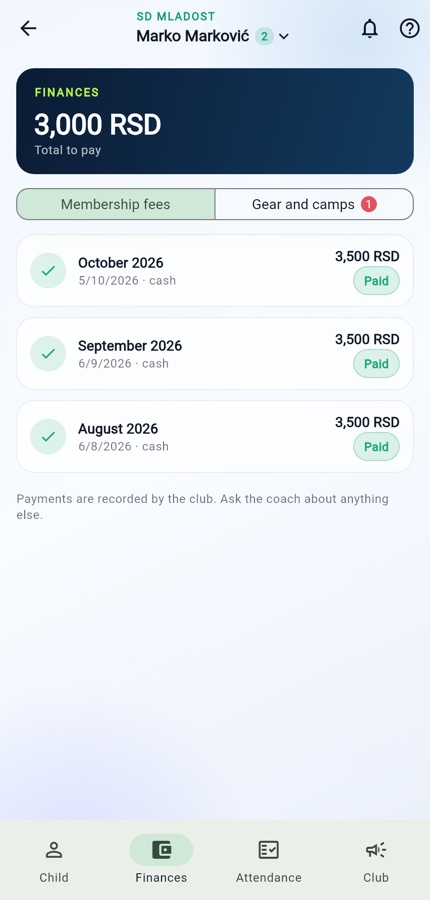
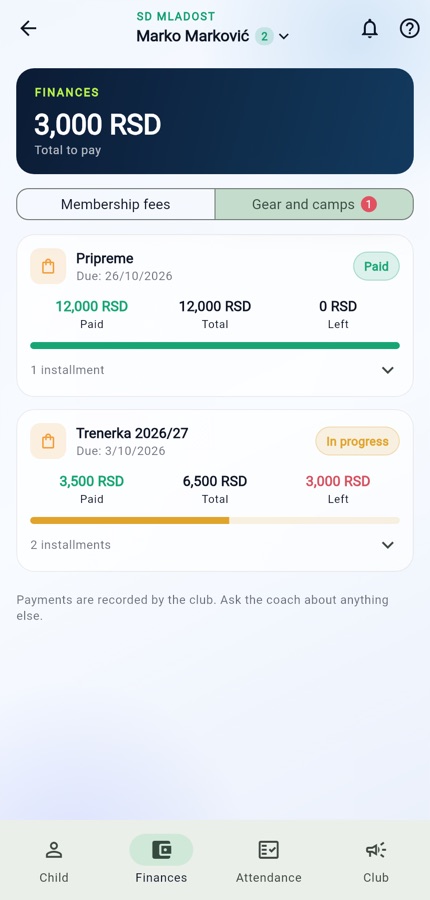
Finances: the total, then item by item
At the top, the total due; below it, membership fees by month, and kit and camps with repayment progress. Payments are recorded by the club — the app does not take money.
The parent records the medical check-up
They take the child to the doctor and are the first to know the check-up is done. They enter the date, and it only counts once the coach confirms it — after seeing the certificate.
Consent in one tap
For photographs or travel, for each child separately. A changed text asks for fresh confirmation.
Team chat instead of a phone group
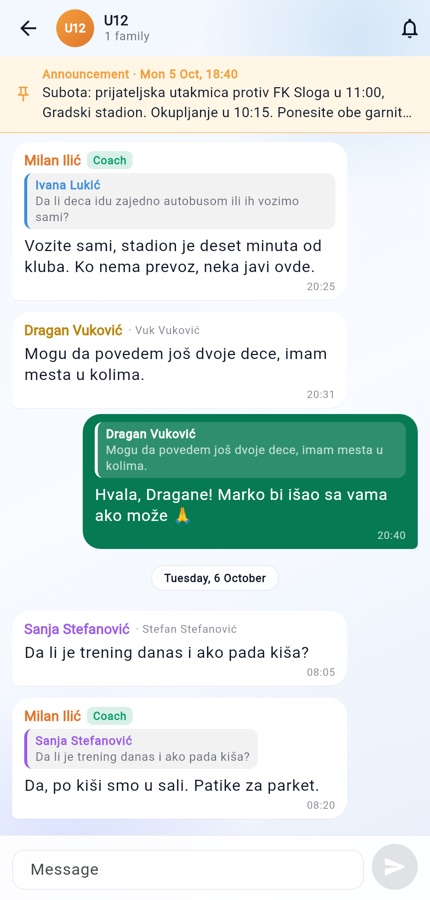
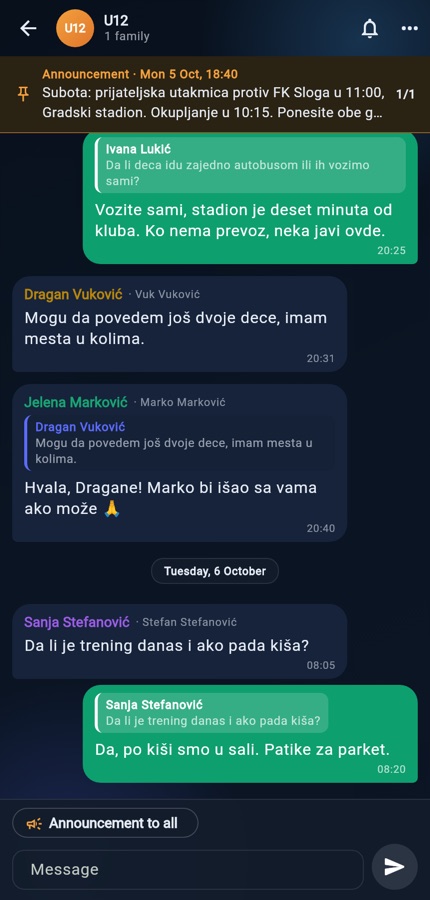
The ‘U10 Parents’ group does two jobs that get in each other's way: the coach announces that training has moved, and parents ask about everything else — until midnight. Here the two jobs are kept apart within the same conversation.
Each name shows whose parent they are
‘Jelena Marković · Marko Marković’. The coach is labelled ‘Coach’. You reply to a message by quoting it, and whoever asked is notified of the answer.
An announcement to everyone doesn't get buried
Written by the owner or a coach, it reaches everyone straight away, stays pinned at the top of the conversation for a week — and the coach sees how many families have read it.
The phone doesn't ring for every word
For ordinary messages, at most one notification per quarter of an hour per conversation, none for whoever has the conversation open, and none at night. Anyone can mute a conversation.
The coach keeps order
A conversation can be set to ‘only the coach posts’, and someone else's message can be deleted — properly deleted, not hidden.
Club admin: calendar, documents, coaches
The things an owner deals with once a week, which today live in three notebooks and one head.

What's on on Tuesday
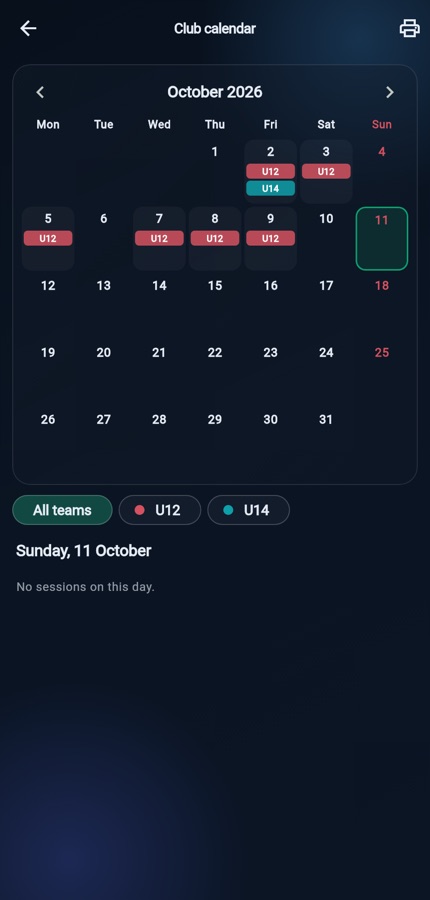
A monthly grid with a team marker on every day, a filter by team, and a tap on a day opens its sessions. A coach scoped to one sport sees their own teams.
Club rules and consents without paper
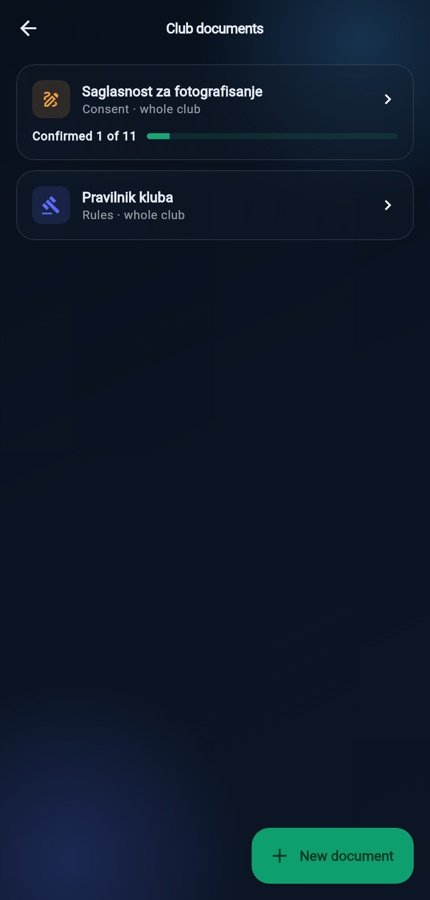
The text and, if you like, a link to the full file. Consent is confirmed for each child, against a version of the text — the club sees who has confirmed, who hasn't and which child has no account.
Coaches record themselves
Whoever takes the roll call was at the session. A second coach is added in the roll call, on the day. Cancelled sessions don't count.
Coach pay at the end of the month
The owner sets each coach's rate per session and sees the total to pay out; a coach sees only their own row.
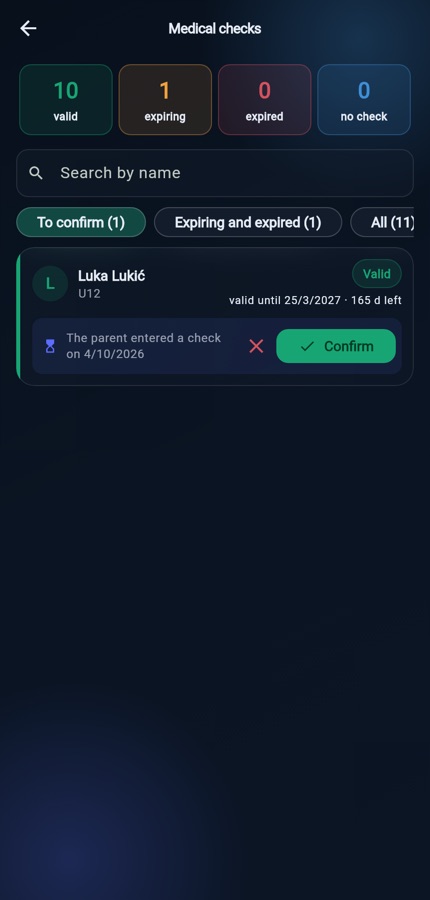
Medical certificates for the whole club
Counts at the top — valid, expiring, expired, none on file — then a list by child with expiry dates. The ‘To confirm’ tab holds check-ups recorded by parents.
Confirmed in one tap
The coach sees the certificate at training and confirms it. An unconfirmed piece of paper doesn't change the expiry date, so the dashboard and the line-up still tell the truth.
One club, four sports
A multi-sport society doesn't run four apps. It runs one, in which each sport has its own numbers — and each coach only their own lists.
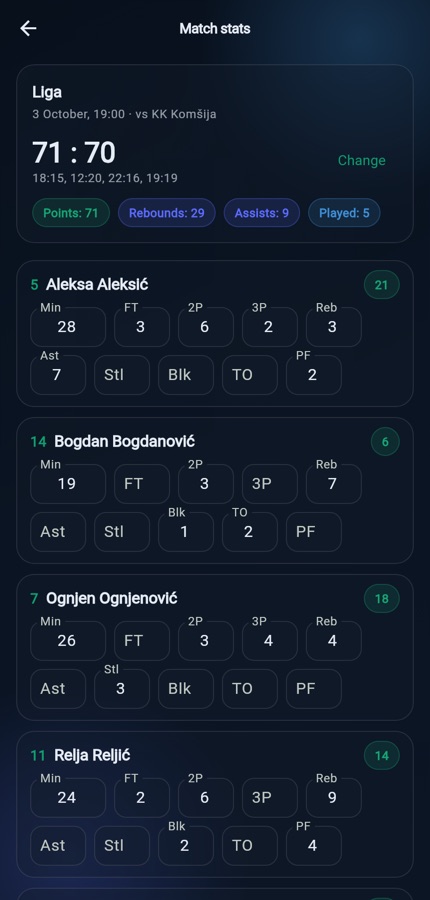
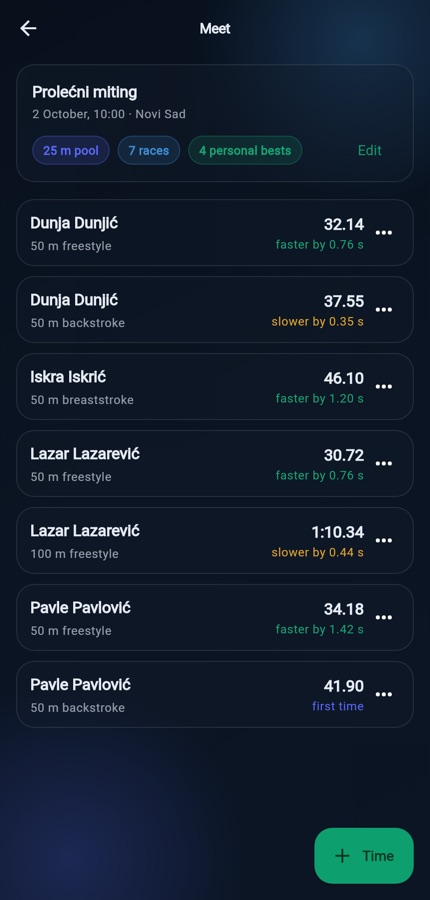
Each sport counts its own way
Basketball counts ones, twos and threes; volleyball points, aces and blocks by set; football goals and cards; swimming times in milliseconds. The score is kept the way that sport keeps it: 3:1 in sets, 71:70 by quarters.
Points are calculated, not entered
Three free throws, six twos and two threes make 21 points. A total typed in by hand sooner or later stops matching how the points were actually scored.
Swimming asks only one thing
Is the child faster than before? So every time comes with the difference from the previous best — ‘34.12’ means nothing to a parent who doesn't follow swimming, while ‘0.76 s faster’ means everything.
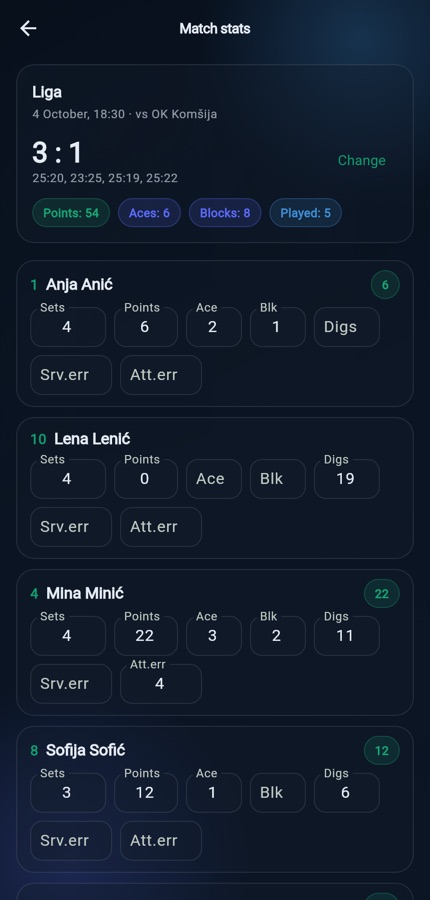
Coaches see their own sport
A basketball coach opens the app and sees their own teams, their own children, their own sessions and their own charges. They don't see the footballers — not because anything is hidden from them, but because they aren't looking for them. The owner sees the whole club, because someone has to.
Parents aren't affected
The split is between coaches, not a wall around the family. A family with two children in two sports has one account and two stories: ratings and matches for one, times and levels for the other.
A new sport is just data
Handball, tennis or a combat sport is added as a row in a registry: positions, ratings with described levels and how scoring works. No waiting for a new version of the app.
Tactics and formations, for every sport
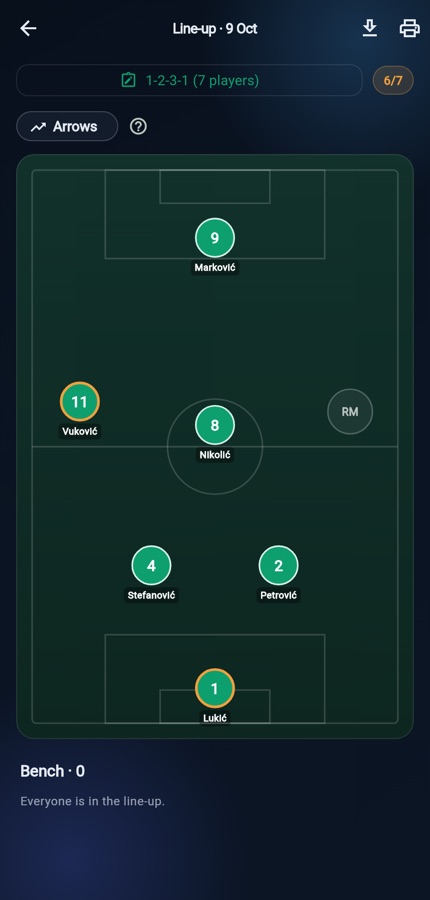
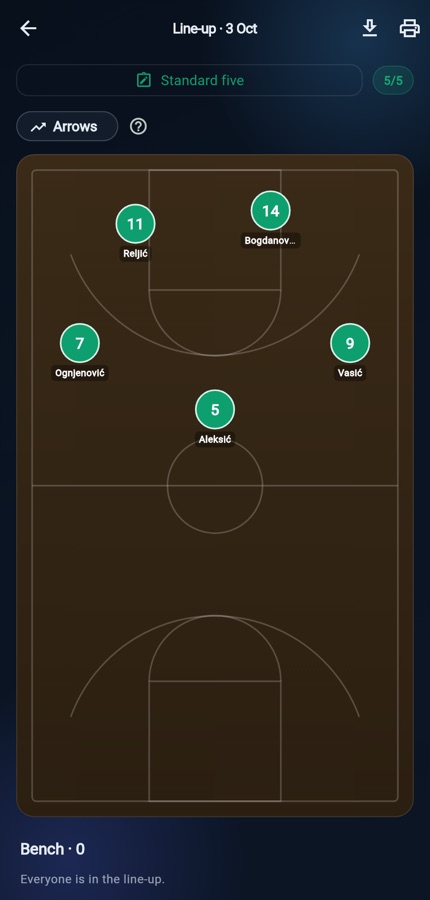
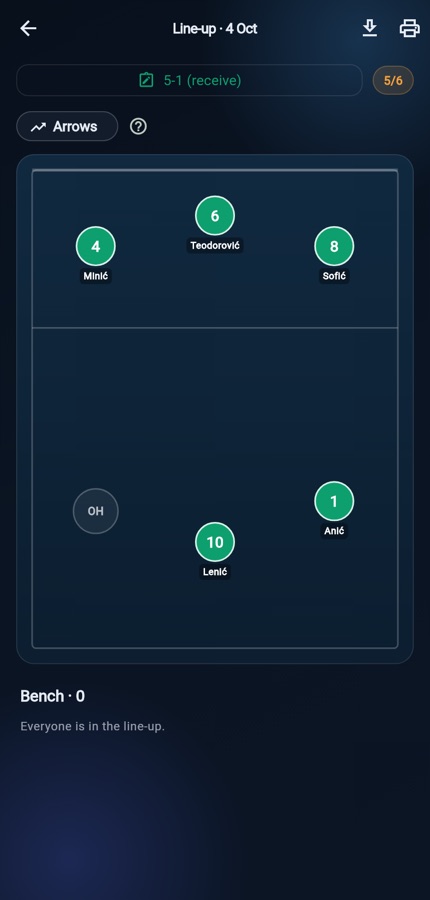
The line-up is built on that sport's own pitch or court: football, basketball or volleyball. Pick a formation, drag the children into position, and the tactic is saved for the whole team and can be carried over to any match.
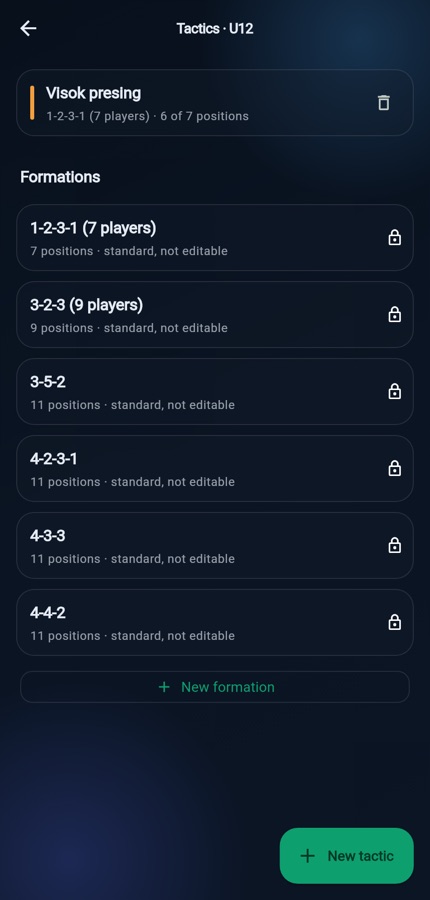
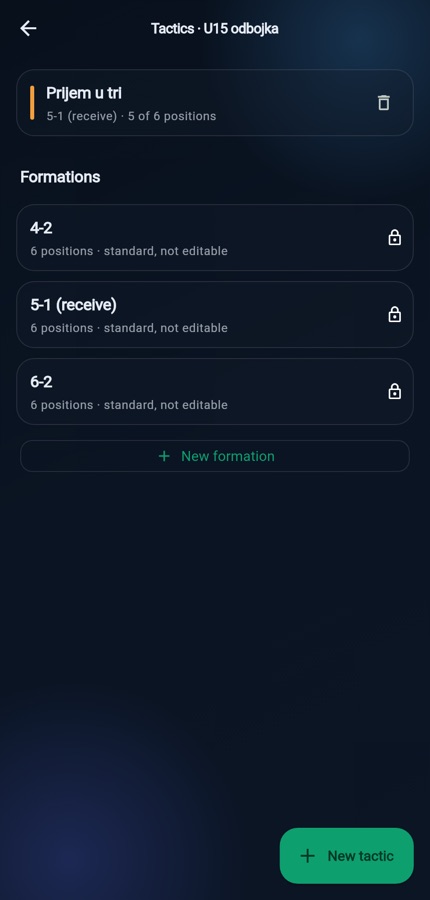
Formations that follow the age group
From 1-2-3-1 for 7-a-side and 3-2-3 for 9-a-side up to 4-3-3; in basketball the standard five and ‘four out, one in’; in volleyball 5-1, 6-2 and 4-2 for younger age groups. The club adds its own, under its own names, and they apply to every team in the same sport.
The tactic is saved, the line-up is carried over
‘High press’ or ‘Three-player reception’ is saved once, as a layout for the whole team. Before a match it's carried over to the session and filled in with whoever is there that day.
The pitch shows what's missing
An empty position stays visible on the pitch — six children for a seven-player formation is obvious straight away, not during the warm-up. A child who is unavailable or without a valid medical certificate is flagged before they go into the line-up.
On paper, on the pitch, in the changing room
Things a club still does by hand but no longer has to: the schedule on the notice board, the tactic in the changing room, a discount for a sibling, a child who also plays for an older age group.
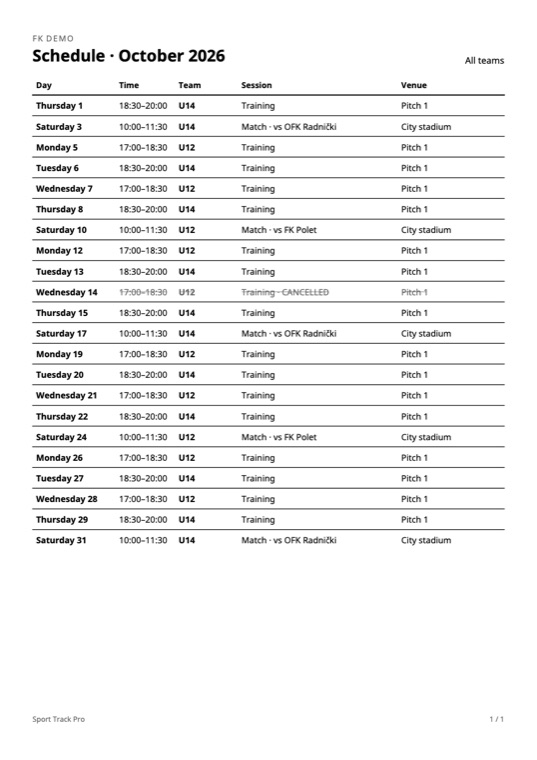
A schedule for the notice board
In the club calendar the owner picks a month (and a team, if they like) and gets a PDF: day, time, team, opponent, venue. Black and white, so any printer in the club can handle it; a cancelled session is struck through, not removed.
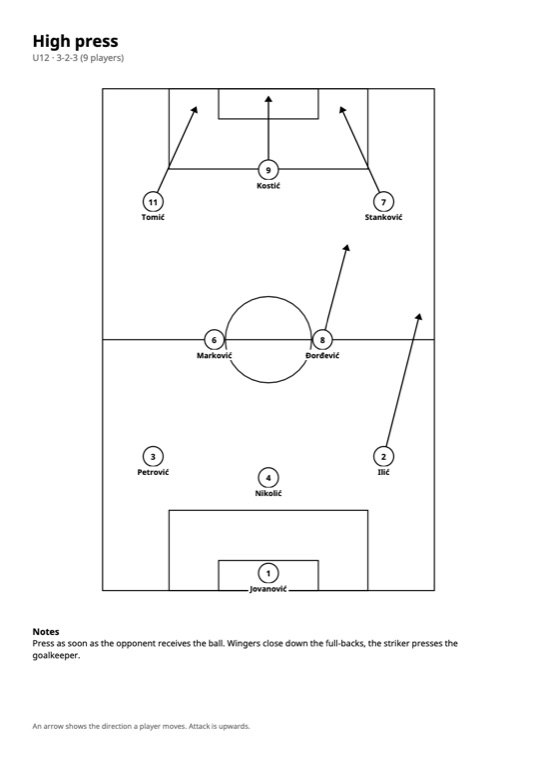
A tactic to pin on the wall
White pitch, black lines, a circle with a number and surname, movement arrows and the coach's notes. A match line-up comes with the bench as well.
Arrows: who runs where
On a tactic, drag from a player in the direction they move; one player can have several arrows. The instructions appear only the first time it's switched on, and after that sit behind the ‘?’ sign. An arrow belongs to a spot in the formation, so it stays when the player is swapped.
Two shirt numbers
Home and away kits don't always carry the same numbers. Both are recorded for the child, per team — 7 in U12, 17 in U14.
Same child, several teams
An advanced child from U12 is also added to U14 as a ‘Child from another team’. Same profile, same parent, same records — no second child with the same name and no second parent account.
Discounts and payment corrections
The owner sets a personal price for a child (a sibling in the club, a family in hardship) and every subsequent team charge respects it. A single charge can be corrected with a note, and any payment can be edited or deleted — all logged with who changed it and when.
The U12 coach sees only U12
When a club has several age groups in the same sport, the owner assigns each coach the teams they run. The coach then sees only those children, sessions, roll calls, chat and charges — the owner still sees the whole club.
A typo in a name
A coach or the owner corrects a child's name in one tap, and the parent account the system created is corrected along with it. The change stays in the club's history.
Medical check-ups recorded by parents
The parent enters the date of the new check-up; the coach confirms it after seeing the certificate. Until then the expiry date doesn't change — the dashboard still tells the truth.
Match day
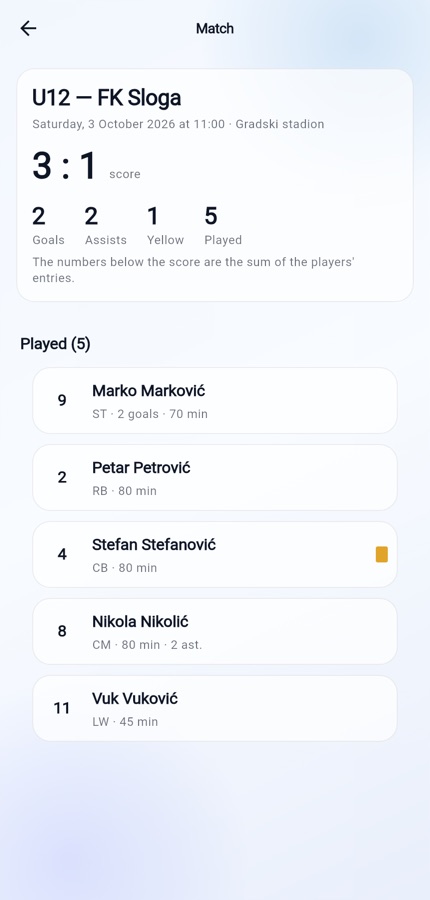
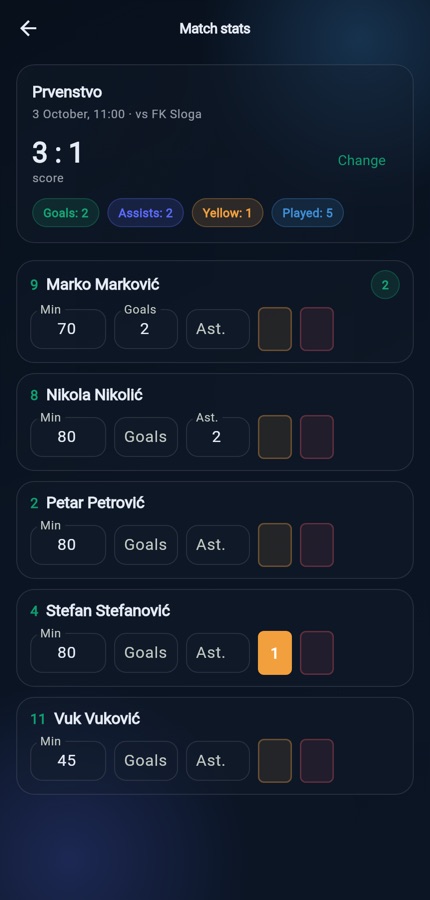
The line-up is made in advance and shows on the session screen. After the match, the score is entered, then minutes played, goals, assists and cards — per player. The parent sees the same, without having to ask.
The score is entered, not added up
Goals by player don't add up to the score: an own goal belongs to nobody, a goal by a player whose stats the coach didn't enter still stands on the scoreboard, and the opponents' goals aren't recorded anywhere else. So the score is kept separately — and shows right in the schedule.
The parent sees the whole match
Who played and until which minute, who scored, who assisted. Until now that was a conversation in the car, and every parent remembered it differently.
A session rating is not an ability rating
A note about the day doesn't feed into the composite rating — they are two different questions, and mixing them spoils both.
The line-up is made in advance
On that sport's pitch, from a saved tactic — see Tactics and formations.
Medicals are checked before the starting eleven
A child without a valid certificate is flagged in the line-up, rather than discovered on Saturday morning.
Notifications that arrive on their own
A message that waits for someone to open it isn't a notification, it's a list. That's why they arrive on the lock screen, and why there aren't many of them: a system that reports everything stops being read by the second week.
Reminders before a session, with a difference
Training six hours ahead, a match a day ahead. A match means ironing a shirt and someone getting time off work, training doesn't — so the lead time isn't the same. The parent can change both.
Cancellations can't be switched off
A parent who drives their child to a cancelled training session has a right to know. It's the only message the settings can't turn off.
Quiet hours
A message arriving at 23:40 wakes the house, and nothing about it changes before morning. At night it's held back — except cancellations.
Messages come from the club, not from us
No marketing notifications and no product messages. The channel that carries ‘training is cancelled’ must carry nothing else, or people switch it off.
User guides (in Serbian)
Three guides, one for each kind of user. Each starts with the same step: how to add the app from the browser to the phone's home screen — Android and iPhone — and how to turn on notifications. For now the guides are available in Serbian only.
Children's data, taken seriously
The club is the data controller; we are the processor. That isn't a line in the terms of use but the way the product is built.
Height and weight are health data
A separate table, stricter access rules, an audit trail. Where to draw the line isn't up for debate — it's designed as if it were a special category.
Medical records are visible only to the medical role
The coach sees ‘valid until’, not the findings. An assistant coach doesn't even see that; other parents never do.
Medical certificates under Serbian Rulebook 88/2020
The expiry date is calculated from the date of the check-up, six months on, and is never typed in by hand. A child without a valid certificate is flagged in the line-up.
Consent per child, per purpose, per channel
A single ‘I agree to everything’ isn't consent. Withdrawing consent for photos removes the child from the gallery and from exports — in the code, not in a promise.
The data stays in Europe
Database, accounts and files — all in the EU. No transfers to third countries that the club would have to explain to parents.
Children don't have their own accounts
The account is held by a guardian. Children can sign in themselves only above the age set by law — 15 in Serbia.